

If you love fun and addictive browser games, Monkey Mart is one of the best games you can play online for free. No downloads, no login just open and start playing instantly.
So you have started playing Monkey Mart, or maybe you are thinking about giving it a try. Either way, you are in the right place. This little monkey game has taken over the internet for good reason. It is simple, it is fun, and before you know it, you have spent two hours building your supermarket empire.
But here is the thing. If you do not understand the controls properly, you will struggle. You will walk into walls, miss customers, and watch your precious coins disappear while angry customers stomp out of your store. Nobody wants that.
This guide will walk you through everything you need to know about controlling your monkey. Whether you are playing on a computer at home, sneaking in a game on your school Chromebook, or tapping away on your phone during lunch break, I have got you covered.
🎮 Play Monkey Mart Online
You can play Monkey Mart directly on our website for free — no download, no login required. Just click and start playing instantly.
Let us get straight into it.
Part 1: The Basics – What Even Is Monkey Mart?
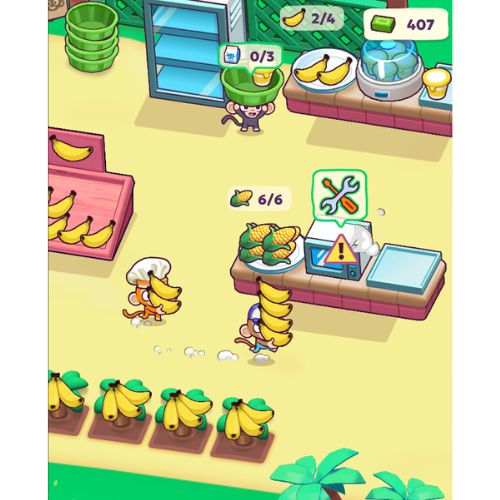
Before we jump into controls, let us quickly understand what you are actually doing. In Monkey Mart, you play as a monkey who runs a grocery store. But this is not just any store. You start small with a simple banana stand. You plant bananas, harvest them, stock your shelves, and sell to customers.
As you earn coins, you unlock new products like corn, eggs, milk, chocolate, and more. You also hire workers to help you because running everything alone becomes impossible pretty fast.
The game sounds simple, and it is. But the controls are what make everything smooth. If you master them, you will grow your store faster and have way more fun.
Part 2: How to Play Monkey Mart on PC (Keyboard Controls)
Most people play Monkey Mart on a computer. It runs right in your browser. You do not need to download anything. No installation, no updates, no hassle. Just open the website and start playing.
If you are playing on a computer, you will use your keyboard to move your monkey around. Here is exactly how it works.
Movement Keys
Your monkey moves using the standard WASD keys or the arrow keys. Both work exactly the same. Pick whichever feels more natural to you.
| Action | WASD Keys | Arrow Keys |
| Move Up | W | Up Arrow |
| Move Left | A | Left Arrow |
| Move Down | S | Down Arrow |
| Move Right | D | Right Arrow |
Most players prefer WASD because it leaves your right hand free for other things. But if you grew up playing games with arrow keys, stick with what you know. The game does not judge.
What Happens When You Move
Here is the beautiful thing about Monkey Mart. You do not need to press extra buttons to do stuff. Your monkey automatically interacts with whatever you walk into.
Walk up to a banana plant? Your monkey starts harvesting automatically. Walk to an empty shelf? You stock it right away. Walk to a customer? You start selling. Walk to a seed bag? You grab seeds and plant new crops.
This auto-interaction is what makes the game feel so smooth. You just focus on moving to the right place at the right time. The monkey handles the rest.
Mouse Controls
You might wonder if you can use your mouse. The short answer is yes, but not for everything. You use your mouse to click on upgrades, hire workers, and buy new products. The shop panels and upgrade menus all work with a simple click.
But for moving your monkey around the store and farm, the keyboard is your only option. So keep one hand on those movement keys at all times.
Part 3: Playing on Mobile – Touch Controls
More and more people are playing Monkey Mart on their phones. It makes sense. Your phone is always with you. You can play for five minutes while waiting for food or sink into a longer session on the couch.
Mobile controls work differently, but they are just as easy once you understand them.
How to Move on Mobile
On a phone or tablet, there are no keyboard keys to press. Instead, you move by tapping where you want your monkey to go. Touch any spot on the screen, and your monkey walks there automatically.
This is actually more relaxing than keyboard controls. You do not have to hold down buttons. Just tap and watch your monkey go.
Automatic Interaction on Mobile
Just like the computer version, your monkey automatically interacts with things when they arrive. Walk near a plant? Harvest starts. Reach a shelf? Stocking begins. Get to a customer? Selling happens.
The game handles all the work for you. Your only job is telling the monkey where to be.
Tapping Menus and Upgrades
The shop interface works exactly like you expect on mobile. Tap on any upgrade to buy it. Tap on a worker to hire them. Tap on a new product to unlock it. Everything is designed for finger taps.
One Small Difference
Mobile players sometimes notice that movement feels slightly less precise than keyboard controls. When you tap a spot, your monkey takes the shortest path there. Sometimes that path is not exactly what you wanted. But with a little practice, you learn to tap smartly and guide your monkey efficiently.
Part 4: Chromebook Players – You Are Covered
If you are playing on a school Chromebook, good news. Monkey Mart runs great on these devices. Since the game is browser-based, you do not need to install anything. Your school IT department cannot block it easily because it runs right in Chrome.
For Chromebooks, you have two options. You can use the keyboard controls exactly like a regular computer. The WASD or arrow keys work perfectly. Or, if your Chromebook has a touchscreen, you can use tap controls just like a mobile device.
Some students like to mix both. They use the keyboard for movement but tap the screen for menu selections. Whatever works for you.
Part 5: Advanced Movement Tips for Faster Gameplay
Now that you know the basic controls, let us talk about moving like a pro. Small improvements in how you move can save seconds. Those seconds add up. More efficiency means more sales, more coins, and faster growth.
Tip 1: Learn the Map Layout
Your store and farm have a specific layout. The planting fields are usually on one side. Your shelves and cash register are in the middle or front. Your storage and new product areas are somewhere else.
Take thirty seconds at the start of each game to look at your layout. Know where everything is. When you need to grab seeds, you should know exactly which way to walk. Hesitation costs coins.
Tip 2: Use Diagonal Movement
On keyboard, you can press two keys at once to move diagonally. For example, pressing W and D together makes you move up and right at the same time. This is faster than moving up then right separately.
Many beginners only move in straight lines. They go up, then right, then down. Pros move diagonally whenever possible. It cuts travel time significantly.
Tip 3: Anticipate Where You Need to Be
Do not just react to what is happening. Think ahead. If your corn is about to finish growing, start walking toward that field before it is ready. If a shelf is running low, head there before it becomes empty.
Good movement is about being in the right place before you are needed. This takes practice, but once you develop this skill, your store runs much smoother.
Tip 4: Tap Smart on Mobile
When playing on mobile, avoid tapping right on top of your monkey. Tapping close to your monkey makes him move in small steps. Instead, tap far away toward where you want to go. Let him walk the full distance without constant taps.
Also, try to tap in open spaces. If you tap on a plant or shelf, your monkey will walk there and start interacting. Sometimes you just want to move past something without stopping. Tap on empty ground to move without triggering interactions.
Tip 5: Reduce Unnecessary Walking
Every trip across your store takes time. Organize your tasks so you do fewer trips. For example, do not run to the field, harvest one plant, run back to stock, then run to the field again. Harvest multiple plants in one trip. Stock multiple shelves before running somewhere else.
Efficient routing is a skill that separates average players from great ones.
Part 6: Control Strategies for Different Stages of the Game
Your control needs change as your store grows. What works in the first five minutes does not work when you have five workers and twelve products.
Early Game – First 10 Minutes
In the beginning, you are alone. No workers. Just you and your monkey. You have to plant, harvest, stock, and sell all by yourself.
During this phase, speed is everything. Move fast. Use diagonal movement. Never stand still. You should be constantly moving from plants to shelves to customers and back.
Focus on short efficient loops. Plant something, harvest it, stock it, sell to a customer, repeat. Do not wander around randomly. Every step should have a purpose.
Mid Game – After Hiring First Workers
Once you hire a stocker or cashier, your job changes a little. You no longer have to do everything. Now you can focus on specific tasks.
If you hired a stocker, you can spend more time harvesting and selling. Let the stocker handle shelves. If you hired a cashier, you can focus on harvesting and stocking while the cashier handles customers.
Your movement should shift toward your most important job. If harvesting is your main task, stay near the fields. If stocking is your main task, patrol the shelves.
Late Game – Full Store with Multiple Workers
When you have all workers, you might think you can relax. Not exactly. Your workers handle routine tasks, but they are not perfect. They get slow. They fall behind during busy times.
In late game, you become a problem solver. Watch your store. If shelves are empty, run over and help stock. If customers are waiting, jump on the register. If fields are full, harvest quickly.
Your movement becomes more reactive. You scan the store, spot problems, and rush to fix them. Fast movement still matters, but smart movement matters more.
Part 7: Common Control Mistakes and How to Fix Them
Even experienced players make control mistakes. Here are the most common ones and how to avoid them.
Mistake 1: Holding Keys Too Long
On keyboard, many players hold down movement keys the whole time. This makes them overshoot targets. They run past the plant they wanted to harvest or miss the shelf completely.
Fix: Tap your keys instead of holding. Make small precise movements. Stop when you reach your target. Precision beats speed when you are learning.
Mistake 2: Tapping Too Much on Mobile
Mobile players sometimes tap constantly. They tap to move, then tap again before the monkey arrives, then tap again. This creates jerky movement and confuses the pathfinding.
Fix: Tap once and let your monkey walk. Only tap again if you change your mind about where to go. Trust the pathfinding.
Mistake 3: Ignoring Workers
Some players keep running around doing everything even after hiring workers. This wastes your time. If you hired a stocker, let them stock. If you hired a cashier, let them sell.
Fix: Learn to trust your workers. Focus your movement on tasks your workers are not handling yet. Let them do their jobs.
Mistake 4: Walking Through Crowded Areas
When many customers gather, moving around becomes hard. You bump into them and lose time.
Fix: Plan routes that avoid the busiest areas. Sometimes walking around the edge of the store is faster than pushing through the crowd.
Part 8: Accessibility and Comfort Tips
You might play Monkey Mart for hours. Make sure your setup is comfortable.
Keyboard Players
Take breaks. Your hands can get tired from constant key pressing. Stretch your fingers. Shake out your hands.
If you play on a laptop, consider using an external keyboard. The flat keys on laptops are not great for long gaming sessions.
Mobile Players
Your thumbs will thank you for taking breaks. Hold your phone with both hands. Use both thumbs for tapping. This balances the workload between hands.
If you have a tablet, consider propping it up on a stand. Tap with your index finger instead of your thumb. It is more precise and less tiring.
Chromebook Players
If you are playing at school, be smart about it. Close the game when the teacher walks by. Use headphones or keep the volume off. Nobody needs to hear monkey sounds during math class.
Part 9: Troubleshooting Control Problems
Sometimes controls do not work as expected. Here are common problems and solutions.
My Monkey Won’t Move
If your monkey is stuck, check that you have clicked on the game window. Sometimes the browser focuses on something else. Click anywhere in the game area to regain control.
If you are on keyboard, make sure no other keys are pressed down. Sometimes a key gets stuck physically or in software. Tap all movement keys once to reset.
If you are on mobile, close and reopen the game. Sometimes touch controls glitch. A quick restart usually fixes it.
Movement Feels Laggy
Laggy movement usually means your browser is struggling. Close other tabs. Restart your browser. If you have many programs open, close some.
On mobile, close other apps running in the background. Battery saver mode can also cause lag. Turn it off if you can.
Touch Controls Not Responding
If taps are not registering, clean your screen. Finger oils can make touchscreens less responsive.
Also check that you are tapping on the game area. Tapping outside the game window does nothing.
Part 10: Practice Drills to Improve Your Control Skills
Want to get better fast? Try these simple practice drills.
Drill 1: The Efficiency Loop
Start a new game. Time yourself. See how quickly you can harvest, stock, and sell your first five bananas. Do it again and try to beat your time. This builds speed and precision.
Drill 2: No Wasted Steps
Play for five minutes with one rule. Every time your monkey stops moving, you must have a reason. If you stand still for no reason, restart. This builds purposeful movement.
Drill 3: Diagonal Only
For one full game, only move diagonally when possible. If you need to go up and right, press both keys. Do not go up then right. This builds the habit of efficient movement.
Drill 4: Tap Once on Mobile
Play one game where you only tap once per destination. No tapping again until your monkey arrives. This builds patience and trust in the pathfinding.
Conclusion
The controls in Monkey Mart are simple. But simple does not mean easy to master. Your movement speed and efficiency directly affect how fast you grow your store and how much fun you have playing.
On computer, WASD and arrow keys give you precise control. On mobile, tap controls let you relax and direct your monkey with simple touches. Chromebook players get the best of both worlds.
Remember these key points:
- Keyboard players should use diagonal movement and precise taps
- Mobile players should tap once and let the monkey walk
- Your monkey automatically interacts with everything
- Good movement is about being in the right place before you are needed
- Practice makes you faster
Now you know everything about controlling your monkey. Go play. Build that supermarket empire. And remember, when those angry customers show up with their red patience bars, your movement skills will save the day.
Happy gaming, and may your shelves always be full.
Frequently Asked Questions About Monkey Mart Controls
Can I use a game controller to play Monkey Mart?
Not directly. The game is designed for keyboard and touch controls. You could map controller buttons to keyboard inputs using third-party software, but most players just stick with keyboard or touch.
Is Monkey Mart available on Nintendo Switch or PlayStation?
No, Monkey Mart is a browser game. It is not available on consoles at this time.
Why does my monkey sometimes stop moving on mobile?
This usually happens when you tap on a menu or upgrade panel. The game thinks you are trying to interact with the menu. Tap on an empty area to resume movement.
Can I customize the keyboard controls?
The game does not have a control customization menu. You are stuck with WASD and arrow keys. Most players find this perfectly fine.
Do controls change when I hire workers?
No, your controls stay the same. But your movement strategy changes. You focus on different tasks as workers handle other jobs.
What is the fastest way to move around the store?
Diagonal movement on keyboard or tapping far away on mobile. Combine with good route planning to minimize travel time.
Visit Related Articles:
Monkey Mart Tips and Tricks – Complete Beginner to Pro Guide
Monkey Mart Not Working? Let’s Get Your Game Back on Track!
Monkey Mart Game Guide for Beginners: Your First Day to Success
